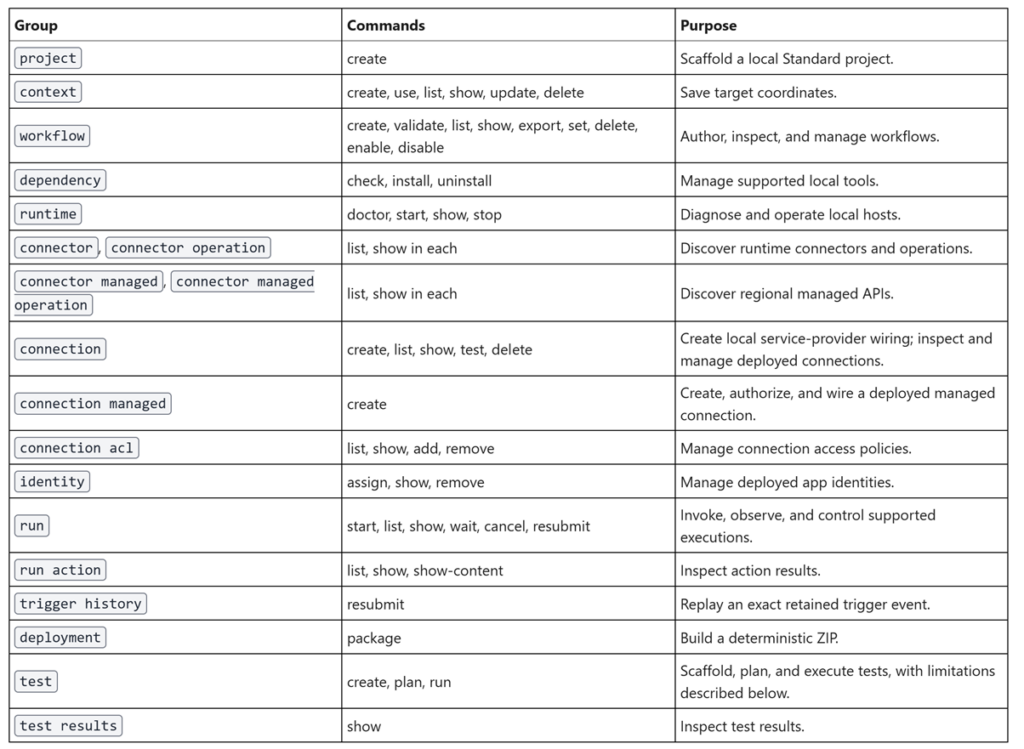
Microsoft’s Azure CLI extension for Logic Apps Standard, previously limited to managing deployed apps, was available in public preview with local development tools as of November 29, 2026. Developers can use the logicapp extension to create, run and test workflows without Visual Studio Code. The visual designer still requires VS Code.
With Azure CLI 2.67.0 or later, the first invocation of an az logicapp developer command automatically installs the extension. Its 13 existing cloud management commands remain unchanged. The preview adds 19 command groups comprising 64 commands.
project create initializes a project or adopts an existing one. Workflow commands create, update, export and validate individual workflow.json files, with validation performed offline by default. Runtime commands start, stop and report on the local host, which uses port 7071. If the project uses development storage, starting the runtime also starts the Azurite storage emulator.
Other commands inspect connectors, configure connections, start and inspect runs, and retrieve the recorded inputs and outputs of individual actions. Named contexts save targets so developers do not have to specify them for each command.
Which commands execute code?
runtime doctor is read-only: it inspects project files, tool versions, cached bundle information and local loopback ports. It does not install software, start services, decrypt settings, change contexts or access cloud storage. A failed required check produces exit code 1; a required check with an unknown result produces exit code 2.
The test commands likewise separate preparation from execution. test create generates a native SDK test project without restoring packages or running code. test plan produces a preflight report. Only test run builds and executes the tests, subject to a time limit. Riley Evans, author of the pull request introducing the extension, noted that native SDK tests run as trusted code, not in a sandbox. Agent bootstrapping commands had not yet been implemented.
Local does not necessarily mean isolated
Microsoft MVP Sagar Sharma argued that the CLI gives AI coding assistants a repeatable way to validate a workflow, run it, inspect the result and revise it rather than guess at its behavior. He also pointed to the use of standard input rather than command-line arguments for secrets. Fellow MVP Sonny Gillissen saw practical uses for team onboarding and CI/CD testing, and suggested an agent could test workflows locally without touching Azure.
Microsoft MVP and certified trainer Christos Panagiotidis identified that last point as something to verify in a proposed pilot, not a finding from a completed test. Microsoft’s walkthrough uses real Azure and Microsoft 365 resources, and some commands modify deployed connections. Running the host locally therefore does not, by itself, keep operations off the cloud. Microsoft also cautioned that validation does not establish that authorization works or that business logic is correct.
For teams comparing runs, Panagiotidis recommended recording the CLI, extension, runtime and project versions alongside each result: updating the CLI does not update the extension. The pull request also noted that passing Linux CI checks does not establish that native SDK tests will execute successfully or that a workflow will succeed against live Azure resources.